Instrumentation & Automation
ru
Application for Windows ⁄ Android

Temperature sensors

The Instrumentation & Automation application for Android includes a data calculation algorithm for most temperature sensors used in industrial automation.

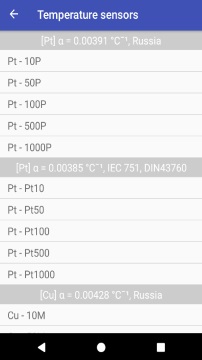
The temperature sensor unit can be launched from the main application menu by pressing the corresponding control element. After that, we can see the list of temperature sensors, shown in the picture on the left (an example for mobile devices).

Select the desired temperature sensor from the list
Main window of the temperature sensor list

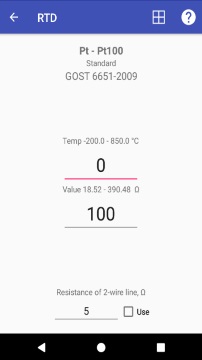
By clicking on the list item, you can select the desired sensor. This opens the window of the selected sensor (figure on the right).

In this window, you can enter the temperature for the selected sensor and get its resistance (Resistance Temperature Detectors) or Electromotive Force (Thermocouples). Conversely, by entering a resistance or an EMF, you can get a temperature. The process is reversible. When pressing the icon Share in the upper part of the screen we get the Temperature - Resistance (or mV) table with a step of 10 ° C.

The program is very handy, especially if it is in your smartphone, it means always at hand.

Cold junction compensation for thermocouples

If the option to use cold junction compensation for thermocouples is set, the value of the cold junction from the temperature to millivolts is first calculated. Then the given temperature is calculated in millivolts, and then millivolts of the cold junction are subtracted from these millivolts.

An example:
  Let's select a thermocouple of type K and take into account the temperature of the cold junction of 20°C.
  The program calculates first: 20°C = 0.7981 mv.
  If the measured temperature is 120°C (4.9199 mv), the resulting value in millivolts is:
  4.9199 - 0.7981 = 4.1218 mv.

Thermistors NTC

To obtain the resistance of the termistor depending on its temperature, and vice versa, the equation of Steinhart - Hart is used::

Rx = Rn * Exp(B * (1.0 / Tx - 1.0 / Tn))

Rx - the calculated resistance of the thermistor (in Ohms) at a temperature of Tx (°K),
  Rn - the nominal resistance of the thermistor (in Ohms) at a nominal temperature (usually 25 °C) Tn (°K),
  B - the resistance temperature coefficient, which, like the nominal resistance, is indicated in the reference documentation for the termistor.

Important!!! Dependence Temperature - Resistance of real thermistors can differ significantly from the equation of Steinhart - Hart, especially at the edges of the range and from a particular manufacturer. Therefore, if possible, it is better to use the documentation of the manufacturer for the termistor under consideration.

In the application, only a pair of the termistors in the general list of sensors are given to the rest of the temperature sensors. It is impossible to make a full table due to the variety of the nominal resistance rates and their resistance temperature coefficients. Therefore, in the application, the Custom NTC Termistor menu item is included, which will help when calculating even an unknown type of thermistor.

Custom NTC Termistor

Custom NTC Termistor

As can be seen from the picture, the window for calculating the custom NTC thermistor consists of two parts; The upper one,- to calculate the main parameters of the termistor, and the lower,- for calculating the Temperature- Resistance (and vice versa). If the main parameters of the termistor are known, you can immediately move on to the lower part of the screen, enter the nominal resistance at a nominal temperature (usually 25 °C) and the resistance temperature coefficient (B). By changing the temperature, we get resistance. On the contrary, changing resistance, we get the temperature.

If the termistor is unknown, then we measure its resistance at two temperature points, enter them in the upper part of the screen, and we get the resistance temperature coefficient B.